The complete guide to visual IVR
As customer expectations for responsiveness and personalization have never been higher, traditional telephone customer service is showing its limitations in terms of adaptability, speed, and convenience for teams. It is in this context that the visual IVR (Interactive Voice Response) is emerging as an innovative alternative, combining telephony with an interactive digital interface to streamline call routing from the very first seconds. This technology, already adopted by many large companies in the telecommunications, insurance, and banking sectors, allows calls to be routed to a digital journey, optimizing both the first-contact resolution rate and customer satisfaction. In this guide, we’ll explore visual IVR in detail by analyzing how it works, its role in optimizing customer journeys and service, and the key factors for a successful implementation.
What is an IVR?
The Interactive Voice Response (IVR) system is a technology widely used in call centers and customer service departments to automate the routing of customer inquiries. When a customer contacts a company by phone, they are greeted by an automated voice message that offers various options, typically by pressing keys on the keypad or via voice recognition. For example: “Press 1 for sales, press 2 for technical support.”
This system helps reduce the workload on customer service representatives by filtering out simple or unqualified requests and redirecting higher-value calls to the appropriate departments. It also helps reduce overall wait times and streamline the caller’s experience. Many companies use it to optimize the management of their call volume, particularly in industries that receive a high volume of calls daily, such as telecommunications, energy, and banking.
While traditional IVR systems are effective at filtering and routing calls, they can quickly fall short when it comes to addressing more complex needs or providing a seamless, personalized experience. Its journeys are often linear and less suited to today’s users’ expectations, who seek greater autonomy and simplicity. In some situations, the lack of visual cues can slow down resolution or make the interaction less intuitive. This can affect the overall efficiency of handling requests and impact customer satisfaction. In response to these new expectations, a new generation of IVR has emerged, designed to offer users greater autonomy and a more seamless experience: the visual IVR.
What is a visual IVR?
A visual IVR, or visual interactive voice response system, is an interactive web interface accessible directly from the caller’s phone. Unlike a traditional IVR, the user does not need to listen to a series of voice prompts; instead, they immediately see a clear, structured graphical menu that allows them to select the purpose of their request with just a few clicks.
This visual navigation offers quick and easy access to various actions, such as viewing FAQs, tracking an order, scheduling an appointment, or filing an insurance claim, depending on the industry. The visual IVR thus facilitates access to self-service (self-resolution) for simple requests, while still allowing users to reach an agent if needed.
Example of a visual IVR:
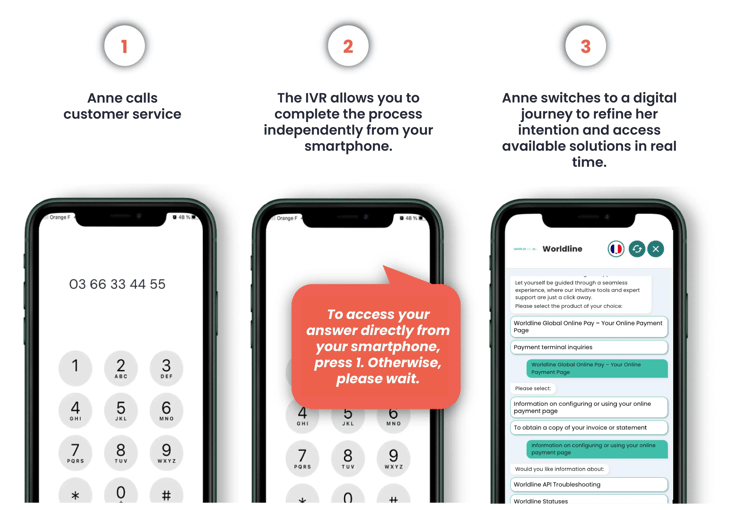
Anne calls Worldline’s customer service to ask a question. Right at the start of the call, the voice server offers her the option to access the answer directly from her smartphone. She then receives a text message containing a secure, clickable link.
By clicking on this link, Anne is guided through an interactive and intuitive digital journey. She can specify the nature of her request, access real-time information, ask a question, or schedule an appointment. In just a few clicks, she finds the right answer or is redirected to an agent if necessary.
This type of system streamlines the customer onboarding process, reduces call volume, and offers a faster and more convenient experience for the user, while optimizing the organization of internal teams.
Its main advantages lie in the simplicity of the process, its round-the-clock availability even outside of business hours, and reduced processing time. Thanks to this solution, customers gain greater autonomy, companies optimize their incoming call volume, and the customer experience is enhanced. Following the implementation of the visual IVR, the tour operator TUI improved its reachability in the French market by 29 points.
-
The implementation of digital solutions has allowed us to redirect a large number of calls to self-service channels. Our advisors’ working conditions have improved, and we can better manage the effects of seasonality.

Director of Customer Relations
Stéphanie Nammour
What are the main differences between IVR and visual IVR?
Traditional IVR operates exclusively over the phone: the user listens to a voice menu and must respond by pressing buttons or speaking. This can sometimes lack flexibility: menus may be lengthy or ill-suited to the caller’s situation, which can make navigation less seamless. Users sometimes have to try several times before reaching the right service, which complicates the process and increases the abandonment rate.
Visual IVR, on the other hand, offers a more modern experience. It appears on the phone screen and offers the option to complete the process independently or contact an agent: the choices are immediately visible, and the customer can click, read, or interact at their own pace. They can also access forms, an FAQ section, or a chatbot. The customer journey is smoother, more guided, and, above all, tailored to customers’ changing habits, especially during times of stress, while on the go, or when they have limited availability. It can also be integrated with all digital channels, making it a central tool for omnichannel strategy.
Orange Business has implemented a visual IVR to streamline its call center operations. Thanks to this solution, 56% of calls have been avoided and redirected directly to a seamless, self-guided digital journey.
-
Our after-sales service is subject to occasional call peaks, and the Visual IVR is an alternative solution that enables our customers to file or consult their incident independently, despite the unavailability of call centers.
Philippe Cappelle
Head of Advisory Services
Why adopt a visual IVR in your customer relationship?
According to the DialOnce & Kiamo 2023–2025 survey, 72% of French people say they trust customer service representatives who can be reached by phone, confirming that this channel remains essential for contacting customer service. However, expectations are changing, and users today are looking for greater speed, convenience, and autonomy in their interactions.
The visual IVR helps reduce call volume by directing simple inquiries to a digital workflow, while allowing agents to focus on complex issues. Customers gain greater autonomy and convenience: no more waiting or being limited by business hours, they can easily access what they need at any time.
Everything has been designed to make navigation simple and enjoyable. The visual interface replaces voice menus which can sometimes be tedious with clear, interactive screens. Options automatically adapt to the customer’s profile, allowing them to go directly to the desired item. This personalized journey saves time, reduces effort, and streamlines the interaction from the very first seconds.
The impact on customer satisfaction is significant: less frustration, a better understanding of available options, and faster resolution. Customers find it easier to express their satisfaction, which translates into a clear improvement in key metrics such as CSAT (customer satisfaction score) and NPS (net promoter score), which often rise after the implementation of a visual IVR. The visual IVR is also designed to be accessible to everyone, including people who are hard of hearing or those who are not fully fluent in the language, thanks to its multilingual interface and its visual, universal, and inclusive nature.
The benefits don’t stop there. From an operational standpoint, the visual IVR also helps reduce Customer Service Center (CSC) costs by limiting the number of transfers to agents. Simple requests are resolved directly through the interface, which lightens the workload on teams and improves productivity. This allows agents to focus on high-value-added inquiries. With the visual IVR, teams free up an average of 20% more time, which they can now devote to more meaningful and complex interactions with customers.
Finally, thanks to data collected on user journeys, companies gain a clear understanding that allows them to continuously adjust and optimize their system, using advanced analytics to better understand usage patterns and pain points.
-
Customer satisfaction
90% Satisfied or very satisfied users with the automated journeys
-
Calls avoided
15% Rate of calls avoided through redirection to a digital journey
-
Reachability
+30 Pts Improvement in the rate of calls handled (via phone or digital) out of the total incoming calls
-
Increased Productivity
+20% Increased time your advisors spend on value-added tasks
What are the main features of a visual IVR?
To meet customers’ changing habits and expectations, the visual IVR includes several essential features designed to make it easier to access information and streamline the entire customer journey:
-
Interactive visual menus: these replace lengthy voice prompts with a clear, structured graphical interface, allowing users to quickly navigate to the right service.
-
Dynamic personalization: the interface automatically adapts based on the user’s profile and the channel being used, offering relevant options from the start.
-
Smart shortcuts: the most common actions (order tracking, scheduling appointments, filing insurance claims...) are highlighted to speed up the resolution of requests.
-
Multilingual support: the system detects the language of the device or user profile and automatically adapts the display, making the service accessible to an international audience.
-
Contextual redirection: depending on the request, the user is directed to the appropriate channel (human advisor, AI agent, next-generation AI chatbots, form, or help content) without interrupting their experience.
-
Integration with internal tools: it is interoperable and compatible with major phone systems and CRM tools (Odigo, Orange Business, Vonage...). It also integrates with FAQs, databases, and ticketing tools, ensuring continuity of service and a comprehensive view of the customer.
-
Advanced analytics: the company tracks customer journeys in real time, identifies pain points, measures performance (click-through rates, resolution rates...), and can adjust workflows to continuously optimize the customer experience.
Use cases
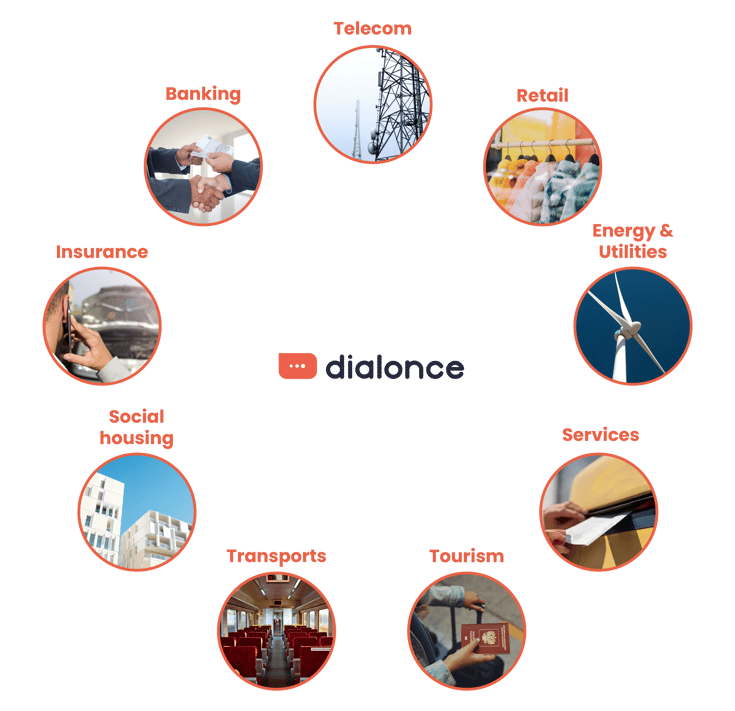
The visual IVR adapts to all industries and addresses a variety of challenges, including managing call spikes, handling recurring requests, providing quick guidance, and improving the customer experience. Here are a few examples of practical applications tailored to specific business contexts:
Banking:
The banking sector benefits from the visual IVR to simplify the handling of frequent requests, such as account inquiries, credit card renewal requests, or routine transactions. By redirecting calls to a digital workflow accessible via, for example, an SMS link, it helps relieve pressure on call centers. Crédit Agricole Nord de France implemented this solution to reduce pressure on its branches and refocus its teams on customer relationships. Since its rollout, 16% of calls have been redirected to digital channels, which has optimized reachability and improved advisor productivity.
Insurance:
Insurers use the visual IVR to guide their policyholders toward appropriate digital solutions, such as interactive forms or self-service portals. This effectively automates simple requests such as obtaining a certificate, filing a claim, or tracking a case while maintaining easy access to an agent when needed. Macif deployed a hybrid customer journey via visual IVR, implemented in just 48 hours, to ensure 24/7 availability and guide members toward digital solutions (self-service or forms). Today, 22% of incoming calls are handled digitally, 60% of sessions are managed independently, and all calls are processed, whether digital or voice-based.
Transportation:
The visual IVR is widely adopted in the transportation sector to automatically route calls to digital solutions and efficiently handle recurring requests such as schedules, service disruptions, or refunds. This system reduces call volume during periods of disruption and improves customer service responsiveness. The RATP has implemented the visual IVR to digitize a portion of incoming calls related to passenger services. This solution now diverts 38% of calls by redirecting them to an appropriate digital channel.
-
The social movement enabled us to deploy DialOnce's Visual IVR, to verify our customers' acceptance of this type of usage and to validate the benefits of the solution for both customers and employees.
Gaëtan Bultez
Head of Customer Service - RATP
How to effectively deploy a visual IVR?
Implementing a visual IVR cannot be done on the fly; it requires a structured approach to ensure seamless user journeys, measurable results, and widespread adoption. Here are the key steps for a successful deployment:
1. Assess existing needs and call flows
First and foremost, it’s essential to conduct a comprehensive audit of incoming call flows. This involves analyzing volumes by request type, identifying times of high volume or call abandonment, and pinpointing friction points in current customer journeys. This step provides a clear understanding of where the experience can be improved and where automation is appropriate. Based on this assessment, clear and measurable objectives are set: reducing redundant calls, improving the first-contact resolution rate, increasing the self-service rate, streamlining call routing, absorbing peaks in activity, and preventing call overflow.
2. Map out typical customer journeys and scenarios
Based on the audit, a detailed map of existing customer journeys is created. This step allows us to clearly visualize touchpoints, expressed intentions, channels used, and any potential roadblocks. Based on this mapping, optimized journeys are designed, taking into account user expectations, best practices in digital experience, and business objectives.
The new scenarios prioritize high-volume or high-frequency use cases such as order tracking, filing an insurance claim, or scheduling an appointment to automate certain parts of the process without compromising service quality. For more specific or sensitive requests, the journey provides a seamless transition to a human agent. This hybridization of digital and human interaction is essential to ensuring a balanced, reassuring, and efficient experience.
3. Define channels and design a seamless experience
The visual IVR can be triggered by sending a link via SMS or RCS during or immediately after a call. To ensure the effectiveness of these workflows, the interface must be designed with a mobile-first approach: it must adapt perfectly to small screens, load quickly, and be immediately understandable. The user experience must be seamless, accessible, and understandable in less than 3 seconds, in order to capture attention from the very first moments and minimize the drop-off rate. The layout, text, icons, and tone of voice must be designed to reassure, guide, and encourage action.
4. Develop and integrate the solution
A visual IVR can be deployed in-house or by working with a trusted vendor. If you choose the latter option, it is essential to partner with an experienced partner capable of offering a solution tailored to your business needs and existing tools. Choosing a competent provider with the right tools and solid technical expertise ensures a smooth, secure, and customized implementation. Tailored onboarding process also guarantees better adaptation to the specific requirements of your industry, as well as strict compliance with applicable regulations such as the GDPR. The ideal partner must also provide ongoing support to help the solution evolve over time, while fostering local innovation.
The interfaces are designed to integrate seamlessly with your brand identity, featuring clear, intuitive, and mobile-friendly navigation. The entire system connects easily to your existing tools via secure APIs, ensuring a seamless and consistent user experience. Rigorous testing is conducted prior to final deployment to validate performance, security, accessibility across all devices, and the software’s ability to handle peak activity.
5. Measure and continuously optimize
Once the visual IVR is deployed, data analysis plays a central role in managing its performance and guiding adjustments. Analytics tools enable real-time tracking of key metrics such as the click-through rate on available options, the resolution rate of requests without human intervention, the abandonment rate during the customer journey, and user-reported satisfaction levels.
This quantitative data is supplemented by qualitative feedback (via post-journey surveys, customer verbatim comments, or field observations) that helps better understand the barriers and drivers of engagement. Cross-analyzing these elements makes it possible to identify friction points, test new wording or journey variations, and continuously optimize interfaces, content, and proposed scenarios.
Which KPIs should be tracked to measure the impact of the visual IVR?
The return on investment (ROI) of the visual IVR is measured using specific indicators, both operational and experiential. Performance evaluation is based on three complementary dimensions: processing efficiency, user experience, and economic impact.
Operational indicators:
-
First-contact resolution rate: measures the percentage of requests fully handled through the visual IVR without needing to be transferred to an agent. The higher this rate, the more efficient and well-designed the customer journey is.
-
Average handling time: this is the time between entering the visual IVR journey and resolution or redirection. A good visual IVR can cut this time in half or by two-thirds compared to a traditional voice-based IVR journey.
-
Call abandonment rate: indicates the percentage of users who leave the journey before completing it. A low rate means the journey is smooth, intuitive, and effectively meets user expectations.
-
Volume of transfers to agents: this metric helps assess how many requests are redirected to a customer service agent. A controlled decrease (without impacting service quality) reflects improved self-service handling.
Customer experience metrics:
-
Customer Satisfaction Score (CSAT): expressed as a percentage, it reflects users’ overall satisfaction with the quality of the journey.
-
Net Promoter Score (NPS): based on the question “Would you recommend this service?”, it measures engagement and loyalty. A rising NPS is often a sign that the customer journey better meets expectations.
-
Adoption rate: measures the percentage of users who choose the visual channel when it is offered to them. A high adoption rate indicates trust in the tool and a positive perception of the digital experience.
-
Qualitative feedback: these are the open-ended comments left by users. They help identify pain points and ideas for improvement, or, conversely, highlight what is working particularly well.
What are the risks or limitations of visual SVI?
Although visual IVR offers many benefits, there are a few considerations to keep in mind to ensure effective deployment and optimal adoption:
-
Variable adoption rates: as with any innovation, acceptance depends on user profiles. Some less tech-savvy audiences may take a little longer to embrace this new channel. Explaining the benefits in simple terms and introducing the service step by step can help customers get used to it more easily.
-
Importance of user-friendly design: a clear, well-structured user journey optimized for mobile use is essential to ensure a smooth and enjoyable experience. This underscores the critical role of UX in the project’s success.
-
Quality of customer data: relevant personalization relies on reliable, well-structured data. Preliminary work on the CRM is sometimes necessary to maximize the fluidity and relevance of the proposed user journeys.
-
Technical adaptation: some internal systems may require adjustments to seamlessly integrate the visual IVR. These are generally minor optimizations, but they must be anticipated.
-
Omnichannel consistency: the goal is not to replace existing channels but to enhance them. The integration of the visual IVR must therefore be part of a harmonized omnichannel strategy to avoid any disruptions in the customer journey.
These limitations are actually opportunities for optimization that enhance the impact of the visual IVS when properly anticipated. A gradual, structured, and well-supported approach allows you to maximize the benefits without compromising the user experience.
Far beyond its initial role of call routing, it transforms the phone reception process into a seamless, intuitive, and personalized experience. By lightening the load on agents, reducing wait times, and empowering users, it enables companies to become more efficient while increasing customer satisfaction.
The visual IVR enables a fundamental rethinking of customer journeys. It simplifies access to information, reduces the volume of redundant calls, and improves satisfaction from the very first seconds. Easily integrated into an omnichannel strategy, it ensures a seamless experience across different touchpoints.
In the coming years, visual IVR will continue to evolve thanks to advances in artificial intelligence and integration with other technologies such as the Internet of Things and augmented reality. It will become an intelligent digital assistant, capable of anticipating needs, personalizing each interaction, and offering relevant solutions in real time, all while strengthening the connection with the customer.