

What is visual IVR?
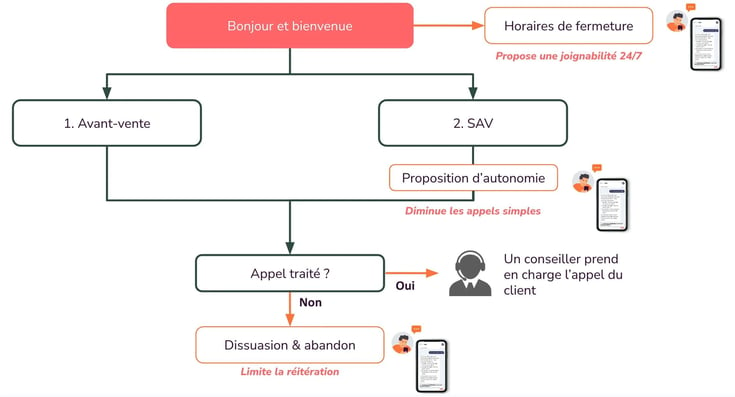
The phone channel remains the preferred solution for customers to contact a company. However, with the rise of digital and the diversification of available channels (Chat, FAQ, Forms, Call-back...), Visual IVR is becoming essential.
Key takeaways
- IVR (interactive voice response) qualifies calls through voice menus; visual IVR extends the call to the caller’s smartphone through a link sent by SMS, RCS or WhatsApp.
- Visual IVR does not replace traditional IVR: it routes simple requests to self-service and keeps human agents for complex calls.
- Visual IVR works with all types of calls, mobile, landline or anonymous numbers, and connects to the CRM to keep customer context.
- At Nickel, nearly 28% of calls were redirected to autonomous digital solutions and call abandonment was cut in half.
What is IVR and why is its use limited?
IVR stands for "Interactive Voice Response". By definition, it is a solution designed to qualify incoming phone calls received by a company, customer service, or a Customer Relations Center (CRC). It is interactive because the caller can engage with the system through voice prompts to indicate their intent and be directed to the appropriate resource. Everyone has encountered IVR before: "If you are a customer, press 1. If you are a partner, press 2." It is a fundamental tool in customer relations, and its usefulness is well established. However, the era when voice was the only available channel for resolving issues is over. Voice interactions often create customer frustrations: multi-step journeys, long wait times, low answer rates, and frequent repetitions are common sources of dissatisfaction. This frustration directly impacts the customer experience and overall satisfaction.
What is visual IVR?
Visual IVR turns a traditional phone call into an interactive digital journey. When a customer contacts a service, a voice message invites them to continue on their smartphone via a link sent by SMS, RCS or WhatsApp. With one click, they leave the voice channel and access a clear, guided digital interface.
This shift to digital replaces long and restrictive voice menus with a simple and intuitive visual experience. The customer can precisely state their need, follow a self-service path and instantly access the solutions best suited to their situation.
Visual IVR works with all types of calls (mobile, landline or anonymous numbers) and can be deployed at scale, including internationally. Connected to existing CRM systems and databases, it ensures seamless information continuity and accurate routing, while making the customer journey smoother and reducing effort for both the company and the user.
Visual IVR does not replace traditional IVR, it complements it.
The IVR still routes calls to the right department and manages call flows.
Visual IVR handles part of the requests directly on the customer’s smartphone. It is used to:
- send simple requests to a self-service digital journey without involving an agent
- improve reachability by responding to every call, even outside opening hours or when phone lines are busy
- prioritise complex calls that truly require a human agent
- encourage customers to use their online account area for everyday requests
How is visual IVR transforming call management?
Visual IVR offers numerous benefits for managing incoming calls, enabling:
Increased customer service accessibility
A concrete example: when a customer contacts the Customer Relations Center (CRC) and the call cannot be handled, whether outside business hours or when all agents are busy, an alternative is provided. Thanks to Visual IVR, the customer is automatically redirected to a digital solution available anytime, significantly improving the accessibility of your customer service.
Cost optimization through call digitization
Another use case: when a customer calls for a low-value request, Visual IVR encourages them to switch to a digital journey. This allows them to handle their request independently, reducing the volume of calls handled by agents. This approach leads to more efficient resource management and a significant reduction in operational costs.
What are the advantages of visual IVR?
From the outset, Visual IVR helps reduce the abandonment rate of customers who no longer wish to wait on hold. In terms of ergonomics and UX, customers are therefore more inclined to specify their reason for contact through a visual rather than a voice-based journey.
Reachability: the primary advantage is optimizing a company's reachability by ensuring a response to 100% of incoming calls, regardless of agent availability.
Customer experience: from the very start of their journey, the customer is directed toward the best solution. They can find their answer quickly with minimal effort; this is the very definition of a satisfying customer experience.
Digital transformation: when a company invests time and resources in implementing digital solutions, making customers aware of these tools can be challenging. However, Visual IVR facilitates the use of these solutions, which are often more efficient and cost-effective.
Agility: managing contact journeys often requires the intervention of technical teams, making the implementation and optimization of these tools long and costly. In this context, Visual IVR empowers business teams, allowing them to make real-time improvements independently.
Why choose DialOnce as your visual IVR partner?
At DialOnce, we firmly believe that the future of customer relations lies in innovative omnichannel solutions designed to put users at the center of every interaction. Our tools, including Visual IVR, enable businesses to tackle strategic challenges such as cost reduction, improved customer satisfaction, and seamless omnichannel journeys. For the past 10 years, more than 150 large organisations have relied on DialOnce to digitize their inbound calls.
As part of their digital transformation, several companies have leveraged our solutions to address specific challenges.
Use case: Nickel
Nickel, operating in the financial sector and facing rapid growth, sought to reduce calls that did not require a customer service representative, accounting for nearly 30% of interactions. By deploying simple and intuitive digital tools combined with a high-performing Visual IVR, the company successfully promoted self-care and significantly decreased customer service requests. Within a few months, wait times were reduced by one minute, call abandonment rates were cut in half, and nearly 28% of calls were redirected to autonomous digital solutions.
-
DialOnce's Visual IVR has enabled us to improve the customer experience while helping to control our flows and therefore our costs. It's a tool that's perfectly adapted to our customers and their behaviors, because it combines the simplicity of the telephone channel with the fluidity of a web-based pathway. The result: customers are more autonomous and find the solution to their problem more quickly!
This example demonstrates how a well-designed solution can simultaneously meet customer expectations and operational needs. With DialOnce, every interaction is optimized to enhance customer relations while fostering a seamless, user-friendly, and digitally driven experience.
Frequently asked questions about visual IVR
What is the difference between traditional IVR, visual IVR and a voicebot?
Traditional IVR guides callers through keypad or voice menus, visual IVR moves the call to a digital interface, and a voicebot holds a natural-language conversation powered by AI. Traditional IVR follows a fixed tree: press 1, press 2. A voicebot, or AI voice agent, understands a freely worded request and can resolve it on the phone. Visual IVR handles the requests that work better on a screen, such as booking an appointment or downloading a document.
How do banks use visual IVR?
Banks use it to route everyday requests, such as balance checks, to self-service and free their advisors for higher-value conversations. At Nickel, nearly 28% of calls were redirected to autonomous digital solutions and waiting time dropped by one minute. At Crédit Foncier, visual IVR cut call volume by 5%, and 91% of customers agree to use it.
Read our case studies to see results across banking, insurance and public services.
When should visual IVR be offered to callers?
Visual IVR can be offered on every call or only in specific situations: long waiting times, call peaks, closing hours, or a simple request identified by the IVR. The right setting depends on the reasons for calling and on the contact centre’s capacity. During the December 2023 strike, RATP used it to absorb the surge: 38% of calls were moved to visual IVR, with a 94% self-service rate.
Is visual IVR the same as virtual IVR?
No: a virtual IVR is an IVR hosted in the cloud, while visual IVR is a digital interface the caller opens on their phone. A virtual IVR avoids buying telephony hardware and scales more easily with call volumes. DialOnce’s visual IVR connects to the IVR already in place, then the company chooses which call reasons open a visual journey. The solution is developed and hosted in France.